Wednesday, March 15, 2017

This will give you the iPhone notifications under control
You missed once again important notifications on your iPhone because they Flash again disappeared after accidental release of smartphones? With the right settings, you can prevent that. Here you'll learn all you need to know about the notifications on the iPhone.
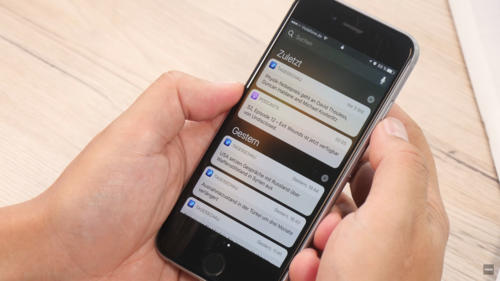
iPhone notifications under control

First of all, you must add important notifications to your message center so that they are displayed even if you have already unlocked your iPhone, whether or not you want it. This option can be found here: "Settings> Messages". Now select the apps for which notifications are displayed in the message center. Make sure that the "Allow messages" and "Show in message center" check boxes are activated. In the same way, it works when you do not want to display notifications of certain programs. So you can disable the notifications for rather unimportant apps, so as not to sink into chaos.

Set a notification style for your notifications

In the next step, you can now configure the hint style in the form of banners and hints. Banners are displayed at the top of the screen, but disappear after a short time without having to activate. Notes, however, remain intact and require an active action - the preferred option for particularly important notifications. Navigate to the following menu: "Settings> Messages".

Now select the application for which you want to define a different hint style. For this to happen, the "Allow messages" option must be activated. Below are the options for the hint style. Here you can choose between "None", "Banner" and "Note". Again, you should take the opportunity to clean up a bit. Select the desired app and select "None" as a hint to continue receiving notifications for the app, but not a bold note in banner form.

Notification sound: To disable it

No question: Important messages should be signaled by a corresponding notification tone. But: Is this actually the case with every app? Do you have to accept any unimportant action on Facebook with a sound on your iPhone? In many cases probably not. Therefore you should go into yourself and check which sounds can be switched off safely. In the "Settings" under "Messages" select the respective app, for which you want to deactivate the sound. This is done by deactivating the menu item "Sounds" by slider.

Badges: How to switch the indicator counter off

The small red circles about apps and folders, the so-called badges, are a fairly practical thing. If an app has new notifications or notices ready for you, the little icon informs you about it without having to open the app before. But in everyday life, this can quickly become confusing, especially in a multitude of applications, and sometimes end in chaos. The problem: The badges only disappear when the corresponding app is started and the notifications have been called. Unfortunately, the icons can not be deactivated completely, but you can still determine for each application whether these badges should be played or not.

By the way: Apple calls the feature in its settings indicator counter. At first glance, it is unlikely to be clear what exactly is behind this description. And so you can disable the badges: "Settings> Messages". Select the desired app for which you want to disable the hints, and deactivate the "Indicator counter" item.

Summary


  1. Define notifications for the message center: "Settings> Messages"
  2. Select the app you want and turn "Show in Message Center" on or off
  3. Set the note style: "Settings> Messages" and select the app
  4. Make sure "Allow messages" is turned on
  5. In the Note Style area, choose "None", "Banner", or "Note"
  6. Turn sound on notifications on and off: "Settings> Messages"
  7. Select the app and make your choice at the "Tones" point
  8. Disable Badges: Select "Settings> Messages" and the app
  9. Turn slider to uncheck the red badges

Thursday, March 9, 2017

Recover deleted notes on the iPhone: How it works
Notes on the iPhone are a practical thing, after all, you can quickly create the shopping list or a to-do list. It is particularly annoying, therefore, if you accidentally removed an entry - but not afraid to restore deleted notes is not so difficult.
How it works

Restore text in a note

If you just deleted the text in a note, but the file itself is still open, you can easily restore the writing with a short shake of the smartphone - of course only if you have not deactivated the function. The feature is activated under "Settings> General> Auxiliary Aids" in the "Shake to revoke" item.

Recover deleted notes

If you have deleted a complete note for any reason, you can also undo this. With iOS, a kind of "paper basket" for deleted notes is installed as standard, in which the removed entries are still lifted for 30 days - similar to deleted photos in the photo book of the iPhones.

However, the notes tray, which allows you to restore deleted notes, is somewhat hidden in the Notes app. You have to tap the symbol with the arrow to the left in the top menu bar in the app. A folder overview appears in which the sub-item "Last deleted" should appear. Tap and then swipe left over the note you want to restore. Use the Move option to move the note back to the place of origin. The same process also works via the "Edit" item at the top right of the screen, which allows you to restore several deleted notes at a time.

If the deleted note has already disappeared from the recycle bin, you can restore it by an old iPhone backup.

Summary


  1. Deleted notes on the iPhone are not automatically lost, there are several ways to restore them
  2. If you have only deleted the text in a note, but the file itself still exists, the function "Shake to revoke" can be used
  3. The function is activated under "Settings> General> Operating aids"
  4. If you have deleted the entire note, you can also find the entry still 30 days in a kind of "paper basket" - this is however somewhat hidden
  5. Alternatively, deleted notes can also be restored via an iPhone backup
Delete photos and messages in WhatsApp: How it works
In the iOS version of WhatsApp, a new feature has been recently added that allows you to delete photos, videos, GIFs, or messages. We explain where the option is hidden and how it works.
Delete photos and messages in WhatsApp: How it works
WhatsApp photos have once again filled the iPhone memory? Then you can delete them now. (© MYTECTECH / WhatsApp 2016)

WhatsApp for the iPhone recently received an update to version 2.17.7, which also introduced a practical new memory management feature. If you already have this WhatsApp version, you can see it in the Messenger under "Settings> Info and Help". There is the version number printed at the top.

How to delete the targeted messages in WhatsApp

While in WhatsApp you had to search for each chat individually and have to select and remove media separately, you can now delete messages, videos or photos in a new overview menu. Unfortunately the developers of WhatsApp hid the new feature but something - you find the function in the Messenger under "Settings> Data and Storage Usage> Save Usage".

In the following menu you will now be able to see all your chats, sorted by the size of the media sent. If you now tap on any chat, you will get a more detailed overview of the sent media and its size as well as the number of messages. If you select "Manage", you can select or deselect entries in the memory list - of course, only if you have actually exchanged the corresponding media files. You can also check off several checkboxes at the same time and delete them.

If you are satisfied with your selection, you can delete the files with a tip on "emptiness" - your iPhone memory, just if it is only 16 GB, it will surely thank you! The feature is also very handy because you can delete the annoying videos from the family group in WhatsApp without affecting the best friend's wedding pictures.

But be careful: After the tip on "Empty" there is no way back, the files are irretrievably deleted. For photos and videos, however, there is still the security network of the Fotomediathek, where the majority of WhatsApp users will see the media as a copy.

You can delete these files specifically in WhatsApp

You can remove these things in WhatsApp's new store management:

• Delete messages
• delete the data exchanged via the contact list
• Delete the mailed sites
• Delete photos
• Delete GIFs
• Delete videos
• Delete voice messages
• Delete documents (for example PDFs)

For Android users the new storage management of WhatsApp is not yet available, but the feature should soon be submitted later.

Summary


  1. With the WhatsApp version 2.17.7 for iOS a new memory management was introduced
  2. This can be found in the menu under "Settings> Data and memory usage> Save usage"
  3. In the overview a certain chat partner must be selected.
  4. You can then delete messages, photos, contacts, locations, etc. of the selected chat partner with a tip on "Manage" and then "Empty"

Sunday, March 5, 2017

In iOS, Android and Windows Phone make a screenshot
Android and Windows Phone make a screenshot

You want to make a screenshot with your smartphone - so create a photo of the contents of the screen? This is no problem with the current operating systems and smartphone models. Both now under iOS as well as with Android and Windows Phone or Windows 10 Mobile the function is fixed.

Many people do not see the screenshot function until they are asked to send a screenshot to show a particular product from an online store. Screenshots are very easy to create with iOS, Android and Windows Phone / Windows 10 Mobile, but there are certain differences between the operating system variants.

Make a screenshot on the iPhone or any other iOS device

Taking a screenshot on iOS devices has been very easy for a long time. This also applies to the current iPhone 7, iPhone 7 Plus and the iPad Pro, as well as all other iOS devices. And so you can make a screenshot:


  1. You call up the screen from which you want to take the photo.
  2. Press the Power button and the Home button at the same time. The screen flickers briefly and you hear a click sound with switched - on sounds - the screenshot was made
  3. You can find the picture in the Photos app in the "Screen photos" or "All photos" section. From there you can share it and send it or continue to edit it.
In iOS, Android and Windows Phone make a screenshot


There are also other ways to make screenshots with the iPhone 7, for example via Assistive Touch. However, you must remember that a lot of screenshots can fill the tight memory of the smartphone and you should also delete the pictures, which you no longer need.

Screenshots in Windows Phone and Windows 10 Mobile

As with iOS, it's similar to the screenshots on a Windows Phone, ie the Lumia devices or other smartphones with the mobile operating system from Microsoft. On Windows Phone 8.1 and Windows 10 Mobile it works like this:

  1. Re-enter the screen to be photographed.
  2. Then press the power button and the volume button.
  3. The screen photo is now automatically saved in the screenshots section of the Photos Hub.
If your phone still runs Windows Phone 8, then you have to use the Windows button under the display instead of the Lauter button. That would be the combination of Windows plus Power.

Make a screenshot under Android - something more complicated

Under Android a screenshot to make is however already somewhat more complicated. This is mainly due to the fact that there is no uniform method. In the early days of Android it was even very complicated to make screenshots at all. This is why there are also some screenshot apps that are here to help.

Make a screenshot under Android

The official Google method to make screenshots in Android works like this:

  1. You reopen the screen you want to record.
  2. Hold down the power button and the quieter button for several seconds at the same time.
  3. The screen space is saved and a small screenshot symbol appears at the top of the screen. The picture itself is in the gallery.

So you can make screenshots with a Samsung device

In iOS, Android and Windows Phone make a screenshot

As far as the theory: For different large manufacturers such as Samsung it works quite different, even depending on the model different. The Samsung Galaxy series is like this:

  1. Display the corresponding screen.
  2. Press and hold the Power and Home buttons for about two seconds. The display flickers and there is a click sound.
  3. You can find the screenshot in the screenshots section in the photo folder.
The normal Google method described above is used for Samsung smartphones without a home button. On many Samsung devices, gestures can also be used, for example by stroking the display with the hand edge. Whether it works with your smartphone, you can check under "Settings> Movements and gestures".

Sony, HTC and LG: Here are some screenshots

In addition to the Google method, Sony also has its own option. This allows you to start the Active Clips app, which allows you to make a screen photo. Or you hold down the power button for about a second and then select "Take Screenshot" in the next window.

In iOS, Android and Windows Phone make a screenshot

The Taiwanese manufacturer HTC is also using Google's method. It is however somewhat complicated, since the keys on the different Smartphone models are always somewhat differently arranged. There is also in the Quick Settings a way to make screen photos.

LG has the buttons but on the back of its current devices, but it does not work quite well with the Koreans: Here, too, you can make a photo of the screen with the combination of Power and Quieter button.

Summary

  1. Screen photos can be made with all major smartphone operating systems such as iOS, Android and Windows Phone / Windows 10 Mobile
  2. There are uniform methods for iOS and Windows Phone
  3. Under Android, the process may vary by manufacturer

Friday, February 3, 2017

Apple intentionally destroyed FaceTime in iOS 6
In the US, many users are taking legal action against Apple. They are accusing the company of deliberately destroying the FaceTime app for iOS 6 to force iPhone users to switch to iOS 7. The background is to be a patent dispute from 2012.
FaceTime in iOS 6

In the US, Apple is currently facing a new lawsuit. In it, several users propose to the company to have made the video chat app FaceTime 2014 in iOS 6 unused by an artificially generated bug. In this way, the company would have forced numerous iPhone owners to upgrade to iOS 7, as reported by AppleInsider. Especially on older iPhones like the models 4 and 4s, however, this resulted in sensitive performance losses.

The consequences of an old patent dispute

Background is apparently a patent dispute from 2012. Last year, the iPhone manufacturer was sentenced to a compensation payment of 302 million US dollars, because Apple for FaceTime had apparently violated a patent of the security company VirnetX. To circumvent further complaints, Apple had to outsource the data transmission of FaceTime chats to external servers of the provider Akamai, which however would have cost the service to unimagined heights. In 2013 alone the server costs the group about 50 million US dollar had tasted.

From 2014 Apple developed a new FaceTime app for iOS 7, where the data no longer had to be transferred via external servers. In order to completely bypass the server costs, the group is supposed to have lambed the "old" FaceTime app for iOS 6 deliberately with an artificially introduced bug, according to the application, to the users to switch to iOS 7 and thus also to the new FaceTime app too to force. In support of their complaint, the plaintiffs have submitted several emails from Apple employees to prove that FaceTime was intentionally destroyed in iOS 6. How the process could ultimately end, is still completely unclear at the moment.

Tuesday, May 17, 2016

Study: Android smartphones rush often from as iPhones
According to a new study, it is much more common in Android smartphones to crash than iPhones. In particular, some Samsung smartphones running not very stable. Apps plummeted to 74 percent of the examined Android devices. but can Reclining Also Apple not.
The Samsung Galaxy S6 crashes
The Samsung Galaxy S6 crashes, according to a new study from relatively common. (© 2015 Samsung)

Google's Android operating system has a failure rate of 44 percent, while Apple's iOS has a crash rate of only 25 percent. These are the findings the Blanco Technology Group, which investigated the crash of Android and iPhone smartphones in the first quarter 2016th The website Business Insider has summarized the results. This mainly affected Asian Android devices, which are responsible for 55 percent of global crashes. This is an increase of five percent compared to the fourth quarter of 2015. In Europe, the crash rate is 35 percent and in North America 27 percent.

Galaxy S5 and S6 plunge you up
The Galaxy S6 and the Galaxy S5 had seven or eight percent, the highest failure rate in the Android camp. This was followed by the Lenovo K3 Note, the Motorola Moto G and the Samsung Galaxy S6 Active. In 74 percent of the examined Android smartphones crashed Apps. Among the iPhones the iPhone 6 and the iPhone 5s were the most affected.

Business Insider explains the Android crashes among others, the high fragmentation of the operating system, which makes security and app development more difficult. 282.5 million smartphones running Android and only 47.3 million with iOS. Applications for communication and social apps were the most responsible for the app crashes, so Business Insider. As consumers but would increasingly rely on their smartphones in their daily lives, crashes would be an important factor in brand choice.

Friday, April 29, 2016

How to Hide Glances on Apple Watch
Hat die einen Apple Watch dediziert the Home Screen? Wie funktioniert das auf Apples Armbanduhr Multitasking? Wann kommt die zum Einsatz Force Touche-Ges? Siri und lässt sich nur mit dem ausgesprochen that "Hey Siri" aktivieren?
How to Hide Glances on Apple Watch
Questions can be answered with a look at the following graph. The 4800 × 3000 pixel image also explains why several o'clock reviewers have "initially quite complicated" described navigating the user interface of the Apple Watch as - the slightly nested user interface will be understood only once.

From reach everywhere: Apple Pay, Siri and their own contacts can be started from all views of the Apple Watch. Apple Pay can be opened with a double-tap on the side-mounted button. Siri starts by a long press on the Digital crown. The contact view opens with a simple push of the button.

Notifications: once received appearance on the watch display new messages and can be accessed from the watch-view with a swipe gesture downwards.


In the watch-view start: From the watch-view can change with a simple pressure on the crown Digital App View. To get back Back to watches view extends a double pressure on the Digital crown.
Apple Watch
Force Touch: run within an active app appears the Force Touch gesture a settings and menu items to the watch-view brings you the powerful pressure to select the dial layout.

Glances: The Glances (the boxes of Apple Watch) can be called up in the watch-view with a swipe gesture upward.


Multitasking: Who is Click twice within an open app on the Digital Krone changes to previously opened app and vice versa.

Wednesday, April 13, 2016

Survey: Teens love iPhones more than Android devices
For teenagers in the US iPhones are apparently in demand as Android devices. In a survey, 75 percent of teens to wish for next smartphone again an iPhone.

What like American teenagers? The investment firm Piper Jaffray asks this question for 16 years every six months and interviewed teens about their favorite brands, the most popular TV shows and things like that. The question of the most popular smartphone is thereby provided regularly. Here, according to CNET, that 69 percent of 6,500 young people surveyed own an iPhone. Compared to the last survey six months ago, the value actually increased by one percentage point.


Teens show conservatively with equipment selection
But not only that. Most teens show apparently also extremely conservative in terms of future election
the iPhone is extremely popular.
For teens, the iPhone is extremely popular.
of its smartphones. According to the study Thus, 75 percent of these teens to want to put back on an iPhone also at their next smartphone. This also represents an increase of one percentage point. Android devices reached only a value of 19 percent.

For tablets, it does not look much different. Here reported 48 percent of the teens to own an iPad. This is one percentage point less than in the survey six months ago. 16 percent have claims to an iPad Mini. After all, 50 percent of teens said they want to put back on an iPad and the next tablet, while 13 percent want an iPad Mini. Only 14 percent want an Android tablet and 19 percent of those who want to buy a tablet, indicated that they would prefer a Windows tablet. Six months ago the value was still here at 23 percent.

Also smartwatches there seems to be among teenagers. Of those who already own such a wearable, reported 72 percent, an Apple Watch intrinsically to call her. However, only 12 percent of surveyed teens had ever a smart watch.

General trend shows a different direction
Interestingly, the overall development in the US is likely having an opposite trend - at least as regards the relationship between iPhones and Android smartphones. According to an analysis by market researcher Kantar Android alone could rise by 11.5 percent in market share between the end of 2014 and the end of 2015, while it was 8.6 percent down for iOS and therefore the iPhone. Interesting will be seen whether this trend will continue in the coming years or whether the teenagers of today will reverse the trend again.

Sunday, April 10, 2016

Google wants to Apple's programming language Swift for Android
Google could use in future Apple programming language Swift for Android. With the new language the developer Java would turn his back and takes account of the open source nature of Swift no royalties to pay Apple.

Android and iOS could be similar in the future - at least as regards the programming languages ​​used. If you believe a recent report from TheNextWeb, then there is Google currently serious thought to use the Apple developer language Swift in future also for Android. Initial discussions this should have already performed with renowned app developers such as Facebook and Google Uber.


Google is relentlessly pragmatic
Behind the considerations seems it stuck to merciless pragmatism. After all, Swift has already proven
Android
Android apps can be programmed in future in Swift.
itself as a programming language for apps on iOS. however, probably much more important to weigh the fact that Swift is officially open source since last summer and can be practically used by any programmer without paying royalties.

Especially this point is likely to be relevant to Google. After all, there is the group for years in a legal dispute with Oracle, its Java programming language is used to date for Android. It concerns the allegation of license infringement by Google. Oracle calls from the Android developers billions of dollars in damages.

Switching from Java to Swift would be complicated but rewarding
A change from Java to Swift would for Google and app developers, however, not a walk. So would Android apps will probably rewritten in the new programming. The operating system itself would have to be maintained for a long time support for both languages, there would certainly not be assumed that even comes close all apps are immediately rewritten in Swift.

In the long run could be a switch to Swift, however, make things for programmers much easier. After all, apps for Android and iOS would then be written directly to the same language. However, Swift is not the only candidate of a new programming language that is currently envisaged of Google. So to be a potential candidate for future Android apps also Kotlin language.

Tuesday, April 5, 2016

Bug in iOS 9.3.1 Provides access to all iPhone photos
iOS 9.3.1 has fixed a bug when opening Safari links - another gap exists but still. Using Siri and 3D Touch can view all the photos on your iPhone even strangers.
Eine neuer iOS 9.3.1-Bug erlaubt Zugriff auf alle Fotos.

iOS 9.3 further remains a problem child - after iOS 9.3.1 had fixed a link-Bug, a YouTube user has discovered a new vulnerability. The reports Daily Dot. The error is not nearly as obvious as the recent bugs in iOS 9.3, however, can properly exploited strangers access to all photos on the iPhone grant. The error is, however, only in the context of 3D touch and therefore only on the iPhone 6s and iPhone 6s Plus. The bow is to occur in all iOS 9 versions to iOS 9.3.1.

The steps that disclose the bug in the video, again to read along:

Without the iPhone with a PIN or fingerprint to unlock, Siri can be activated with the command "Hey Siri"
Then allowed Siri to Twitter Search
Search for the second part of an e-mail address such as "@ gmail.com"
Siri is a result, it selects a tweet that contains a complete e-mail address
Tap Tweet and then with 3D Touch open the pop-up window
"Add New Contact" key
When editing of the new contact you can now edit the photo box, select a photo and then is able to view all the pictures stored on the iPhone
How Daily Dot objecting to law, the bug of course requires considerable knowledge of the vulnerability. Furthermore, the iPhone asks for many users at the beginning of Siri search for "Twitter" well but after entering the PIN. After several repetitions you can search without entering the code but then also. To close the gap, you should disable access to Siri in lock screen under "Settings> Touch ID & code> Siri".

Siri is almost traditionally a vulnerability in iOS. So you could deal in iOS 9.0.1 the PIN with a Siri-question of time.

Tuesday, March 29, 2016

iOS 9.3 bugs: New version for old devices

After the first release version of iOS 9.3 was plagued by various bugs, Apple repaired by now. On Monday a new version for older iPhones and iPads was published.


Apple released a new version of iOS 9.3 released with the build number 13E5237, which aims to overcome the activation bugs of the first version. The reports 9to5Mac. Already last Thursday, Apple had 9.3 specially rolled out a new version of iOS for the iPad 2, which was most affected by the error. The new version of iOS 9.3 is aimed at owners of an iPhone 5s or earlier or an iPad Air or earlier.

Safari Bug probably still not resolved

As more users had complained about the Activation error, Apple withdrew the first version of iOS 9.3 for older devices and not signed it. Users who are affected by the bug can restore your iPhone or iPad using the DFU mode and a relationship with iTunes. Whether the second version of the software update also fixes the error, the apps to crash when opening Safari Links, is unclear.

Apple had iOS 9.3 rolled out shortly after the presentation of the new iPhone SE on 21 March. The update - which had previously passed through all seven beta releases - brings with among others the new Night Mode Night Shift. An overview of all new features of iOS 9.3 can be found in this guide.

Sunday, March 27, 2016

iPad Problems: Apple released new version of iOS 9.3

The update to iOS 9.3 made on some older Apple devices for problems after downloading. The company has the software update now withdrawn for older smartphones and tablets, and released a new version, at least for the iPad. 2

Despite seven beta versions of the launch of iOS 9.3 of problems was overshadowed - especially on older Apple devices like the iPad 2 could trigger serious errors the software update. Some tablets could be after a failed activation simply no longer use. As MacRumors reports, Apple has now responded and iOS 9.3 retracted for older devices like the iPad Air and earlier, and the iPhone 5s and
iPad Problems: Apple released new version of iOS 9.3
earlier.

iPad 2 gets new version of iOS 9.3

Owners such smartphones and tablets that have iOS 9.3 not downloaded, so have to wait for now. At least for the most affected iPad 2 Apple has but now released a new version of iOS 9.3, which is to fix the activation failure. If and when new versions of iOS 9.3 coming for other older Apple devices, is still unclear.

In a statement over iMore Apple expressed to the iOS 9.3 error. "When updating some older iOS devices (iPhone 5s and earlier, and iPad Air and earlier) on iOS 9.3, the Apple ID and password must be entered. In some cases, such as when users no longer be able to remember their password remains the device in a non-activated state until the password has been entered correctly or reset. " In addition, Apple has set up a support page on the subject.

Monday, February 29, 2016

IOS 10-Concept with 3D Touch in Control

This iOS-10 Concept comes especially with a significantly improved control center. Shortcuts can not only move or replace. The operation via 3D touch inside the control center is possible.


Apple's operating system iOS 10 should bring much more new features with it as it was the case in 9 release of iOS. Designer Sam Beckett has his desires and expectations visualized in an iOS 10 concept now, reports MacRumors. The introduced with iOS 7 Control Center would therefore come consequently improved. Thus, for the shortcuts to move not only to any position by drag and drop, and an exchange of services is uncomplicated. Standard shortcuts such as WLAN or flight mode so could be replaced by a personal hotspot or location services. The direct starting a timer is possible as well as a shortcut to certain camera functions.


iOS 10 concept with 3D touch operation in the control center

That's not all: The shortcuts can even use 3D touch in the form of so-called Quick Actions operate. A courageous pressure on the wireless network icon would indicate a variety of different wireless networks. The new Night Shift mode, which will be celebrating in iOS 9.3 debut, would also benefit from Quick Actions directly in the control center. If the concept of finding their way into reality, to iPhone owners also likely to appreciate a "Dark" mode. So far, iOS does not offer such a feature.

In any case are to iOS 10 little reliable information is known. While it is expected a better photo app, but more points are completely open. Apple is expected to introduce its new operating system as part of the developer conference WWDC, which is expected to take place in June. Along with the iPhone 7 expected to be published iOS 10 in September.

Wednesday, February 24, 2016

Android devices more error-prone than iPhones - or not?
According to a new statistics come 85 percent of all problems with smartphones on Android devices, and only 15 percent on iOS devices. However, this distribution is likely to result primarily from the respective market share of the platforms. Interestingly, the study but in other respects.

Android smartphones are more prone to problems than iPhones - which says at least a new report Blancco Technology Group, which examines the performance of smartphones. 85 percent of all problems that have been reported in the fourth quarter 2015 from smartphone users, thus came from Android devices. Only 15 percent came from iPhones.

The market share perspective, most numbers

Looking at these statistics regardless of the market share of each producer, then it looks as if Android smartphones generally much more prone to errors than iPhones. However, this observation into perspective almost completely once the market share of operating systems and manufacturers is included in the calculation. So Android has had, according to Gartner in the fourth quarter 2015, a global market share of 80.7 percent, while iOS and therefore the iPhone came to 17.7 percent.

Substituting the market share and the error messages into consideration, then turns out that with Android smartphones statistically only minimally more problems than with iPhones. However, this is also hardly surprising, since iPhones in each case are high-end devices, while Android devices will be sold at price below 100 euros and then, of course, also with much leaner hardware. Bottom line, it is likely problems on Android and iOS devices so enter with similar frequency.

Poor mobile networks in Europe?

It is interesting, rather, what problems are reported by the customers from the various regions. So the statistics in Europe has clearly led to problems with the network operator. Whopping 42 percent of all reported errors were therefore due to the signal of the network operator. In second place then followed with 14 percent call problems. In the third, fourth and five eventually followed problems with the camera, advanced camera problems and Error Wi-Fi coverage area.

In North America and Asia, the mobile networks seem to be much more developed than in Europe. In both regions, namely our problems with the network operator and call problems not among the top five of the most common problems. Instead, the statistics are cited in both North America and in Asia to problems with the performance of the smartphone. On the places two, three, four and five then follow problems in both regions with camera, battery, headphones and the microphone.

Wednesday, February 17, 2016

Fies: pranksters use iPhone-date bug out
A particularly nasty iPhone Prank promises currently the activation of a "Easter Eggs", the device data is being changed to 1 January 1970th Actually, however, this date ensures that the iPhone does not work anymore.

Just last week we reported at this point on an iPhone bug that reset the machine when changing the date to January 1, 1970 out of action. Now there are reportedly on Imgur the net obviously some pranksters that exploit the bug for a particularly nasty prank. Using an image they promise that on the iPhone a classic Macintosh Theme from the 1970s will be shown as "Easter Egg" as soon as the date is set to January 1, 1970th

A Macintosh Theme from 1970?
This is of course complete nonsense. So it was in the 1970s at all no Macintosh and therefore no Macintosh Theme. The first computer of this series was introduced only in early 1984th In addition, the change in date leading up to the fact that the iPhone freezes on reboot and no longer works. Affected are apparently all iOS devices with 64-bit processors from the A7 chip.

Changing the date destroys the iPhone
The user who has set his iPhone in this way incapacitated, then one is compelled to leave as repair the smartphone at the Apple Store. Alternatively, the bow should also be rectified by the battery is briefly removed from the iPhone and used again as a video on YouTube showing. However, this repair should be performed only with a special tool and always at your own risk. and will void the warranty on the device.

iOS apparently has problems with the Unix time
the bug in the iPhone is triggered apparently by a faulty adaptation of the devices to the Unix time. Unix is ​​a 1969 developed operating system that is the basis for iOS and many other modern operating systems. January 1st 1970, defined as the start time for Unix computer systems. Why this date calculated on iOS systems results in an error, in other current operating systems but not is unclear. Apple, however, has already announced plans to correct the error with an iOS update.

Thursday, December 17, 2015

solve iOS 9.2.1 Beta 1 inch problems app installation
9.2.1 Apple has released the first beta of iOS for download for developers. The update is expected to resolve in addition to various bug fixes and problems that have occurred during the installation of apps.

Just over a week after the release of iOS 9.2, Apple has now released the first beta 9.2.1 to iOS developers. The reports MacRumors. What brings the update with the build number 13D11 exactly for improvement, but still remains unclear. However, the iPhone maker has released a new support document, problems with the app installation are explained via Mobile Device Management in the. Accordingly, it can happen sometimes in iOS 9.2 that installing applications can not be successfully completed.

iOS 9.2.1 should fix problems with app installation
Apple is already working on a problem-solving - quite possible, therefore, that this bug with the update to iOS 9.2.1 will be removed from the world. Only since last week, the US company distributed for its iPhones, iPads and iPod touch, the fairly extensive update iOS 9.2. In addition to many stability improvements, the software update also brings some new features to smartphones and tablets. Apple's Siri voice assistant speaks, for example, now even Arabic.

Update to iOS 9.2.1 is expected to be limited to bug fixes
In addition, the mail program can now also process large attachments, the system-app iBooks can look forward to the support of 3D Touch. In addition, the Safari View Controller was now open for third-party. And the in-house music streaming service Apple Music has been optimized properly in handling. For iOS 9.2.1, Apple will, however, probably concentrate on minor bug fixes. When the software is distributed to the users, but still remains open.

Monday, December 14, 2015

Windows 10 Mobile shows the weaknesses of Android and iOS
Windows Mobile 10 is just appeared. Even now manages the Microsoft system, but to set out some glaring weaknesses of Android and iOS. Is the new Windows for Smartphones better than the competition?

In 1995 I got my first PC. From today's perspective, of course, a laughably lame duck, it was then an impressive device. It had namely Windows 95 on board. At the time, that was all the rage when it comes to software development and the most advanced operating system in the world. At least I thought so at first. Only later did I realize that Windows 95 and was no more than a graphical user interface for MS-DOS.

The age-old operating system still puttering behind the façade, which was partly a pain especially in view of new application areas such as the then little-known Internet. How big the shortcomings of Windows 95 actually were, but I noticed only later, when Microsoft showed Windows XP, how to do it better.

History repeats itself
Why do I tell this story? Just because my Windows has recently again brought 10 Mobile a similar experience. About a week I was able to deal with the new Microsoft Lumia 950 and of course with its operating system to date me. While the phone has made a very good impression even, I am impressed even more by the software.

Finally, after what felt like 100 attempts, it seems to have Microsoft managed to develop a mobile Windows that actually is good. The software runs smoothly, the user interface is very clear after a short and also looks damn chic. In addition, new features such as Windows Hello and Continuum, which are really clever. On my Windows 95 experience made me Windows but especially therefore recalls 10 Mobile, because it has led me realize how obvious but some weaknesses of Android and iOS compared.

Rules and individualization
It begins at the home screen. At first glance, here dominates the same tile menu as with previous versions of Windows for smartphones. In fact, Microsoft has, however, found a pretty clever way to make the homescreen highly individualized. So I as a user, not only the arrangement of the tiles determine, but also their size. This is also within folders that I should bear on the main screen, which results in some small but excellent advantages in operation and handiness.

Storage Management: Yes, so what is there!
Another very important point relates to the file and storage management. Again, Windows has me out 10 Mobile, the weaknesses of the competitors quite clearly in mind. So when my Android is often not clear which data are stored on the smartphone where and how do I then find these. And why I have with in-app downloads often not even the opportunity to decide where I want to save data? On the PC has always been that is good manners! But that's still better than iOS, where you best know terms such as file and storage management also in 2015 by hearsay. Modern is no longer, and certainly not in times where Google and Apple are selling their tablets as professional devices.

And it's not even so that Microsoft is doing great work here Witches. As complex as the home computer, the memory management is on the smartphone namely not. But even small concessions like a menu from which can be centrally controlled, if certain file formats to be stored by default on the internal memory or microSD card, already acting in the smartphone sector as a revolution.

Updates: The Right Approach
Also updates are something where Microsoft so fast nobody fooling. Granted, as a PC user I'm sometimes annoyed them, at what pace now raus hauen the Redmond new updates to their software. In practice, however, these frequent updates have two key advantages: they make the system more secure and they give Microsoft the chance to fix errors relatively promptly.

And yes, I remember times when Windows and security were a combination that has rarely found together. That has changed luckily fundamentally. With the monthly security patches from Microsoft vulnerabilities are closed in a very high pace. This also makes hopes for smartphones with Windows Mobile 10. Especially since Microsoft has already announced in advance, not to be in the Updates reinreden of manufacturers and mobile operators. Correct! Because the law must not have the network operator to withhold me a security patch for my smartphone?

Granted, this is an Android exclusive problem because Apple has always adopted the updates into their own hands. On the other hand, Apple has also to care only about its own devices because iOS only runs on this. Windows Mobile 10 will remain, however, not limited to just Microsoft smartphones.

Continuum: Finally something new
At Continuum I have already written a lot. In short, I find this feature awesome. A PC, operating system and apps will automatically adapt to the presentation on a large monitor from the smartphone. Theoretically enables entirely new applications for smartphones. Unfortunately, currently only support a few apps that function, but the potential is there. Imagine, for example, I stay in a hotel and want to watch the latest episode of the current series Netflix anyway - not on your phone, but the TV. With Continuum, the Netflix app would bring theory to the TV. The TV set would then only the Monitor for Smartphone. Currently Netflix does not yet support this feature but unfortunately.
As mentioned: The potential is huge. So-cool it would be by the way, if Microsoft would bring a smartphone with x86 processor on the market that on Continuum also the classic Win32 apps can display from the PC. The ominous Surface Phone haunts already for a while through the rumor mill.

Everything better than Android and iOS?
Wipe Windows 10 Mobile on Android and iOS so with the ground? No, maybe not, but only a different kind of approach has already shown me clearly where to Google and Apple would be plenty of room for improvement still. Maybe you have to ask the question of whether a smartphone in light of new usage scenarios in software even in 2015 still has to work just like in 2008? Maybe the software design needs after a few years simply times a fundamental makeover.

Windows 10 Mobile has just what the app-supply concerns still considerable backlog compared with Android and iOS. In some respects, however, it looks downright fresh and sheds light on areas on which for a long time a thick layer of dust appears to be in the competition. I therefore hope that more developers to support Windows 10 with Mobile Apps, making the system even more interesting for the customer.

Friday, November 13, 2015

Even a music streaming service: Google launches YouTube Music
With YouTube Music Google will now start its own music streaming service for which there is a special app. Although free of charge, but who wants to use all the features, the pay offer YouTube Red must order. Still, the new service is available only in the US.

After Google launched its commercial-free pay offer YouTube Red in the past month, the search engine giant is now bringing an appropriate app on the competitive market, reported about The Verge. And Google has a huge chance to roll up this market with its range from behind. Because the potential user community of YouTube is with over 1 billion more than the 75 million Spotify or Apple Music with 15 million.

YouTube Music: Streaming is not in Europe
Right from the start there is the YouTube Music app for both iOS as well as Android - but unfortunately initially only in the US. But we must assume that other countries will follow soon, surely it should be special problems in Germany because of the known GEMA restrictions. With regard to the functions, the app is lavishly equipped: On the home screen, you will find in addition to its personalized music also two genres that are also selected according to the listening habits. When the music is playing, you can see in the app two tabs on which the current song, and just more offers are displayed.

By advertising for free, with no ads for $ 9.99 / month
This is the way, really abundant and covers about 30 million songs, which is also available at major competitors. Plus, of course, above all the videos that accompany the songs. All the fun is at first completely free, but who wants to use certain features, YouTube Red needs for currently $ 9.99 a month to subscribe. Who wants to hear a song, for example, no video, it must be a subscriber. Omitting the video streaming course saves data volume. Also you have to pay if you want to listen to his music offline or without advertising. Another exciting feature is the offline Mixtape, with which one can get from the app put together a playlist according to his wishes.

Thursday, November 12, 2015

Samsung S2 Gear: iOS support is yet to come in 2015
Rumors of a iOS support for the Samsung S2 Gear has been around for months. Now the thing is concrete: Supposedly the compatibility coming later this year with iPhones.

The Samsung S2 Gear should still get this year an update that allows a connection with iPhones. The SamMobile writes, citing a report from Vietnam. The iOS support is to be made possible by an app, install the iPhone owners, and then can be used to setup the Gear S2. Apple users are supposed to get all the functions that are also users of Android smartphones available. For additional features like Samsung Pay, however, a Samsung mobile phone is still needed.

Gear S2 already compatible with many Android smartphones
Samsung itself has not yet mentioned any release date for a Gear S2 app for iOS. Rumors of a connection possibility of SmartWatch with the iPhone there were in September and therefore long before the appearance of the clock. Moreover, compatibility of the Samsung S2 Gear would result with iOS sense. So Samsung has already significantly expanded the connectivity options of Tizen-SmartWatch compared to Gear S.

While Gear S could be connected from the 2014 only with certain Galaxy smartphones, the Gear S2 supports all Android devices from version 4.4 with at least 1.5 GB of RAM. In addition, the competitive system Android Wear is since April 2015, with iPhones compatible. A Samsung Gear S2 with iPhone connection would therefore enhance the potential buyers circle of SmartWatch significantly.
Firefox for iOS now available for download
Immediately is available with Firefox for iOS a browser alternative for iPhones for download on the App Store. The release of Firefox had been delayed because Mozilla had given up its opposition to a publication of open software in the App Store only in the last year.

The iOS version of Firefox has been tested for several months intensively in various beta versions, as always is the case with software from Mozilla. The first version of the browser had been distributed to selected testers already in May. And now there is the finished product, which is, however, something hard to find in the App Store. As a search for "Firefox" still brings no matching results, it is better to choose a detour via Google.

Firefox Release: Much competition for iOS
In iOS browser market, there are plenty of competition with the house of Apple Safari, Google Chrome or Opera. In addition, suppliers like AdBlock cavort in the browser segment also positive, so that Firefox needs to make its special qualities to the test now.

Currently there are those primarily in the fact that the many loyal Firefox users can use their accounts with the iOS version: bookmarks, history, passwords and other work on an Apple device. However, Mozilla hopes that functions as the search prediction, the Tab-management and anonymous browse other users are attracted.

In initial tests showed that Firefox for iOS is quite nimble, but that in comparison with other browsers bottom line is also little difference in performance. So remains to be seen whether Firefox its success can also be repeated on iOS. Anyone who wants to test the browser needs to at least iOS 8.2.