Tuesday, March 14, 2017

Windows-iPhone: Hackers brings to the iPhone 7 Windows XP
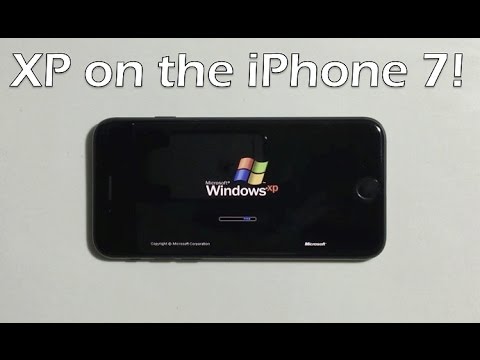
Recently also Windows XP - at least with an emulator running on the iPhone 7. In a YouTube video, a hacker demonstrated how to get the old PC operating system on the Apple Smartphone.

If you opt for an iPhone, you can automatically switch to the operating system iOS with all its advantages and disadvantages. But now there is a YouTube video showing how a hacker can run the ancient PC operating system Windows XP on a current iPhone 7 - and even use it with the touchscreen.

No hack but an emulator

However, this is not really a hack, but actually an emulator, which is installed on the iPhone and then runs Windows XP on the device. Remarkable is how well the emulator apparently functions and how the control of the mouse pointer was adapted to the touchscreen of the smartphone. This way the screen reacts like a trackpad: The pointer is moved by wiping and menus and folders can be opened by tapping.


Of course, the user friendliness remains modest overall. As usual with most emulators, it takes a feeling eternity to load the operating system on the iPhone and also the operation of the icons remains ultimately quite tricky. In the end, with Windows XP on the iPhone 7 but can not really do much. After all, the operating system was developed for completely different devices. Nevertheless, it is, of course, cool to see Windows XP on a smartphone.

Sunday, March 5, 2017

In iOS, Android and Windows Phone make a screenshot
Android and Windows Phone make a screenshot

You want to make a screenshot with your smartphone - so create a photo of the contents of the screen? This is no problem with the current operating systems and smartphone models. Both now under iOS as well as with Android and Windows Phone or Windows 10 Mobile the function is fixed.

Many people do not see the screenshot function until they are asked to send a screenshot to show a particular product from an online store. Screenshots are very easy to create with iOS, Android and Windows Phone / Windows 10 Mobile, but there are certain differences between the operating system variants.

Make a screenshot on the iPhone or any other iOS device

Taking a screenshot on iOS devices has been very easy for a long time. This also applies to the current iPhone 7, iPhone 7 Plus and the iPad Pro, as well as all other iOS devices. And so you can make a screenshot:


  1. You call up the screen from which you want to take the photo.
  2. Press the Power button and the Home button at the same time. The screen flickers briefly and you hear a click sound with switched - on sounds - the screenshot was made
  3. You can find the picture in the Photos app in the "Screen photos" or "All photos" section. From there you can share it and send it or continue to edit it.
In iOS, Android and Windows Phone make a screenshot


There are also other ways to make screenshots with the iPhone 7, for example via Assistive Touch. However, you must remember that a lot of screenshots can fill the tight memory of the smartphone and you should also delete the pictures, which you no longer need.

Screenshots in Windows Phone and Windows 10 Mobile

As with iOS, it's similar to the screenshots on a Windows Phone, ie the Lumia devices or other smartphones with the mobile operating system from Microsoft. On Windows Phone 8.1 and Windows 10 Mobile it works like this:

  1. Re-enter the screen to be photographed.
  2. Then press the power button and the volume button.
  3. The screen photo is now automatically saved in the screenshots section of the Photos Hub.
If your phone still runs Windows Phone 8, then you have to use the Windows button under the display instead of the Lauter button. That would be the combination of Windows plus Power.

Make a screenshot under Android - something more complicated

Under Android a screenshot to make is however already somewhat more complicated. This is mainly due to the fact that there is no uniform method. In the early days of Android it was even very complicated to make screenshots at all. This is why there are also some screenshot apps that are here to help.

Make a screenshot under Android

The official Google method to make screenshots in Android works like this:

  1. You reopen the screen you want to record.
  2. Hold down the power button and the quieter button for several seconds at the same time.
  3. The screen space is saved and a small screenshot symbol appears at the top of the screen. The picture itself is in the gallery.

So you can make screenshots with a Samsung device

In iOS, Android and Windows Phone make a screenshot

As far as the theory: For different large manufacturers such as Samsung it works quite different, even depending on the model different. The Samsung Galaxy series is like this:

  1. Display the corresponding screen.
  2. Press and hold the Power and Home buttons for about two seconds. The display flickers and there is a click sound.
  3. You can find the screenshot in the screenshots section in the photo folder.
The normal Google method described above is used for Samsung smartphones without a home button. On many Samsung devices, gestures can also be used, for example by stroking the display with the hand edge. Whether it works with your smartphone, you can check under "Settings> Movements and gestures".

Sony, HTC and LG: Here are some screenshots

In addition to the Google method, Sony also has its own option. This allows you to start the Active Clips app, which allows you to make a screen photo. Or you hold down the power button for about a second and then select "Take Screenshot" in the next window.

In iOS, Android and Windows Phone make a screenshot

The Taiwanese manufacturer HTC is also using Google's method. It is however somewhat complicated, since the keys on the different Smartphone models are always somewhat differently arranged. There is also in the Quick Settings a way to make screen photos.

LG has the buttons but on the back of its current devices, but it does not work quite well with the Koreans: Here, too, you can make a photo of the screen with the combination of Power and Quieter button.

Summary

  1. Screen photos can be made with all major smartphone operating systems such as iOS, Android and Windows Phone / Windows 10 Mobile
  2. There are uniform methods for iOS and Windows Phone
  3. Under Android, the process may vary by manufacturer

Tuesday, February 16, 2016

Lumia 650: Microsoft presents new Windows phone
From Microsoft takes a new mid-range smartphone in February. The Lumia 650 will cost, ranking priced at the lower end of the segment 229 Euro. The Windows manufacturer indicates that the device is not alone interesting for private customers, but also for the business sector.

Microsoft donated its new Lumia as more in this price range and more common, a metal case and a classy design - how the manufacturer writes on its official blog the release of the smartphone. The new Lumia model completes the line of new Lumia devices that was launched in late 2015 with the Lumia 950, the Lumia 950 XL and the Lumia 550th The device will be sure to see Microsoft also at MWC 2016th

The Lumia 650, of course, running Windows 10
The Lumia 650, of course, running Windows 10, it is held in the colors black and white and the OLED display is 5 inches tall, and dissolves in HD quality with 1280 x 720 pixels. The processor has four cores that are clocked at 1.3GHz and 1GB of memory accesses to. The camera on the back of the device has 8 megapixels, front camera has 5 million pixels. The device memory is not dimensioned lush with 16 GB but can be expanded thanks to a slot for a microSD card. In addition, the battery is replaceable, its capacity is 2000 mAh. All data that do not appear particularly spectacular indeed.

The housing is made of polished and anodized aluminum, the entire device weighs 122 grams and is not just so a heavyweight in the smartphone ring. The device is 6.9 millimeters thick and 142 x 70.9 millimeters. Microsoft announced that the Lumia 650 will be on sale from 18 February.

Monday, December 14, 2015

Windows 10 Mobile shows the weaknesses of Android and iOS
Windows Mobile 10 is just appeared. Even now manages the Microsoft system, but to set out some glaring weaknesses of Android and iOS. Is the new Windows for Smartphones better than the competition?

In 1995 I got my first PC. From today's perspective, of course, a laughably lame duck, it was then an impressive device. It had namely Windows 95 on board. At the time, that was all the rage when it comes to software development and the most advanced operating system in the world. At least I thought so at first. Only later did I realize that Windows 95 and was no more than a graphical user interface for MS-DOS.

The age-old operating system still puttering behind the façade, which was partly a pain especially in view of new application areas such as the then little-known Internet. How big the shortcomings of Windows 95 actually were, but I noticed only later, when Microsoft showed Windows XP, how to do it better.

History repeats itself
Why do I tell this story? Just because my Windows has recently again brought 10 Mobile a similar experience. About a week I was able to deal with the new Microsoft Lumia 950 and of course with its operating system to date me. While the phone has made a very good impression even, I am impressed even more by the software.

Finally, after what felt like 100 attempts, it seems to have Microsoft managed to develop a mobile Windows that actually is good. The software runs smoothly, the user interface is very clear after a short and also looks damn chic. In addition, new features such as Windows Hello and Continuum, which are really clever. On my Windows 95 experience made me Windows but especially therefore recalls 10 Mobile, because it has led me realize how obvious but some weaknesses of Android and iOS compared.

Rules and individualization
It begins at the home screen. At first glance, here dominates the same tile menu as with previous versions of Windows for smartphones. In fact, Microsoft has, however, found a pretty clever way to make the homescreen highly individualized. So I as a user, not only the arrangement of the tiles determine, but also their size. This is also within folders that I should bear on the main screen, which results in some small but excellent advantages in operation and handiness.

Storage Management: Yes, so what is there!
Another very important point relates to the file and storage management. Again, Windows has me out 10 Mobile, the weaknesses of the competitors quite clearly in mind. So when my Android is often not clear which data are stored on the smartphone where and how do I then find these. And why I have with in-app downloads often not even the opportunity to decide where I want to save data? On the PC has always been that is good manners! But that's still better than iOS, where you best know terms such as file and storage management also in 2015 by hearsay. Modern is no longer, and certainly not in times where Google and Apple are selling their tablets as professional devices.

And it's not even so that Microsoft is doing great work here Witches. As complex as the home computer, the memory management is on the smartphone namely not. But even small concessions like a menu from which can be centrally controlled, if certain file formats to be stored by default on the internal memory or microSD card, already acting in the smartphone sector as a revolution.

Updates: The Right Approach
Also updates are something where Microsoft so fast nobody fooling. Granted, as a PC user I'm sometimes annoyed them, at what pace now raus hauen the Redmond new updates to their software. In practice, however, these frequent updates have two key advantages: they make the system more secure and they give Microsoft the chance to fix errors relatively promptly.

And yes, I remember times when Windows and security were a combination that has rarely found together. That has changed luckily fundamentally. With the monthly security patches from Microsoft vulnerabilities are closed in a very high pace. This also makes hopes for smartphones with Windows Mobile 10. Especially since Microsoft has already announced in advance, not to be in the Updates reinreden of manufacturers and mobile operators. Correct! Because the law must not have the network operator to withhold me a security patch for my smartphone?

Granted, this is an Android exclusive problem because Apple has always adopted the updates into their own hands. On the other hand, Apple has also to care only about its own devices because iOS only runs on this. Windows Mobile 10 will remain, however, not limited to just Microsoft smartphones.

Continuum: Finally something new
At Continuum I have already written a lot. In short, I find this feature awesome. A PC, operating system and apps will automatically adapt to the presentation on a large monitor from the smartphone. Theoretically enables entirely new applications for smartphones. Unfortunately, currently only support a few apps that function, but the potential is there. Imagine, for example, I stay in a hotel and want to watch the latest episode of the current series Netflix anyway - not on your phone, but the TV. With Continuum, the Netflix app would bring theory to the TV. The TV set would then only the Monitor for Smartphone. Currently Netflix does not yet support this feature but unfortunately.
As mentioned: The potential is huge. So-cool it would be by the way, if Microsoft would bring a smartphone with x86 processor on the market that on Continuum also the classic Win32 apps can display from the PC. The ominous Surface Phone haunts already for a while through the rumor mill.

Everything better than Android and iOS?
Wipe Windows 10 Mobile on Android and iOS so with the ground? No, maybe not, but only a different kind of approach has already shown me clearly where to Google and Apple would be plenty of room for improvement still. Maybe you have to ask the question of whether a smartphone in light of new usage scenarios in software even in 2015 still has to work just like in 2008? Maybe the software design needs after a few years simply times a fundamental makeover.

Windows 10 Mobile has just what the app-supply concerns still considerable backlog compared with Android and iOS. In some respects, however, it looks downright fresh and sheds light on areas on which for a long time a thick layer of dust appears to be in the competition. I therefore hope that more developers to support Windows 10 with Mobile Apps, making the system even more interesting for the customer.
Tuesday, November 10, 2015

Leaked release dates for old Lumias: Windows 10 Mobile
The Microsoft Lumia 950 and the Lumia 950 XL are the first smartphones with Windows 10 to be mobile when they come later this month on the market. But even older Lumia models will receive the update to the new OS version - rumored in two waves from 14 December.

For desktop and notebook PCs Windows 10 has been available since the end of July. But the release of mobile device is no longer far. With the Lumia 950 and Lumia 950 Microsoft XL will go 10 Mobile in Europe at the start on 28 November 2015, the first two smartphones running Windows. Following also owners of older Lumia devices from Windows 8.1 are expected to migrate to the new mobile operating system. When the update should be available for the model, now seems to reveal a leak in advance of the OS release.

Windows Mobile 10 for older Lumias from 14 December
Orange Poland, a Polish mobile operator wants to have experienced, according to GSM Arena, that the release of Windows 10 takes place Mobile for older Lumia models in two waves. From December 14 to Lumia 630, 635, 640, 735 and 830 to benefit from the new operating system. Owner of a Lumia 520, 532, 625, 720, 820, 920, 925, 930, 1020 or 1320 will have to be patient, however still much longer. For their smartphones, the update will supposedly be rolled out only from 1 February 2016th

New video shows highlights of Windows 10 Mobile
That the Lumia 1520 in Leak is not mentioned, is probably because it was only offered contract-free in Poland. And the mentioned dates, of course, refer only once to Poland. However, it is quite conceivable that Microsoft follows a similar schedule in other European countries. Preliminary Windows Mobile 10 Publication You can put yourself thanks to a new video that Microsoft released on Monday, making already familiar with the key features of the new operating system.

Monday, November 2, 2015

Successor to the Lumia 950: Microsoft tests processors
Microsoft has just released its first new Windows Mobile-10 flagship Lumia 950 and Lumia 950 XL because running internally apparently already testing for the successor. The 2016er smartphones seem to get a particularly strong processor again.

The Lumia 950 and Lumia 950 XL are not even delivered in Europa, as there are already rumors about the successor. As Nokia Power User claims to have learned, Microsoft is testing internally already processor chips for the possible 2016er smartphones. Especially in high demand currently stands, the new Snapdragon 820 chip from Qualcomm, which should come in the Galaxy S7 allegedly used. According to the report of the Windows Group tests at least two different new flagship - an indication of a Lumia 960 and Lumia 960 XL?

Has Microsoft also a Surface Phone in the works?
When Lumia 950 and Lumia 950 XL Microsoft relied on a special Liquid Cooling Technology to 808 or 810 to cool the processors Snapdragon in particular stresses as the Continuum function. The cooling should be with Snapdragon 820 further improved the Lumia 960, also because Qualcomm has itself to fight again with heat problems.

In addition to the plans, according to latest reports Lumias Microsoft in 2016 even the release of a Surface Phone as a further flagship. However, the device is to focus less on specs, and more on productivity features. The business mobile phone for example, could support Win32 apps and expand the Continuum function even further.