Thursday, March 16, 2017

IPhone 8: Curved display - but not like Galaxy S7 Edge
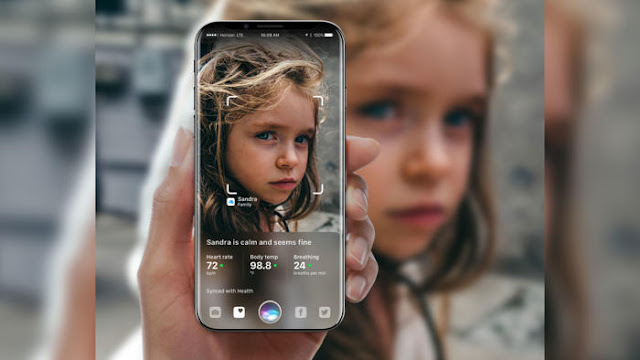
The iPhone 8 is to get a bent OLED display, but only to a small extent. Anyone hoping for a similarly large curvature, as Samsung uses it for its Galaxy S7 Edge, should be disappointed. Anyway, the Curved screen of the iPhone 8 is more likely to serve aesthetics, new controls are not expected.
IPhone 8: Curved display

Is the iPhone 8 now a curved screen or not? At least the Japanese side Nikkei Asian Review expects a curved display for the anniversary iPhone, reports MacRumors. The curvature will be significantly lower than the Galaxy S7 Edge. In any case, it is a challenge to produce such a curved glass. The visible area of ​​the iPhone is supposed to be 5.2 inches, but "no new significant functions" offer, the unspecified source is cited.

IPhone 8: Flat display uses "OLED not optimal"

The messages about the installed panel in the iPhone 8, however, differ slightly from each other. The market analysis company IHS Markit expects a conventional flat design. The well-known Apple analyst Ming-Chi Kuo is in the same direction, he also reckons with a so-called 2.5D glass, which Apple since the iPhone 6. But: A slightly curved display might correspond to this assumption. Apple would "use OLED not optimally", if only a conventional and thus flat screen would be installed, the insider continues to report. The design is not yet final and could change until the release.

Together with the iPhone 7s and the iPhone 7s Plus, the iPhone 8, also as an iPhone edition in conversation, should be presented on the traditional September keynote. However, industry observers expect a later appearance for the iPhone 8 with a later appearance than for the S-models - possibly only towards the end of the year at a price of more than 1000 US dollars.
HTC 11 could already be shown on 20 March
The new HTC 11 could already be presented on 20 March. On Twitter the manufacturer has at least a cryptic announcement with the words "Sping is coming" published.
HTC 11 could already be shown on 20 March

LG has presented its new flagship G6 at the end of February at the MWC 2017, Huawei also - and Samsung follows with the Galaxy S8 on 29 March. Now only HTC is missing, whose new flagship for 2017 is still waiting. This could change however already on Monday, because for this date the manufacturer has announced at Facebook a special surprise event.

The spring is coming - and with it a new HTC smartphone

To what exactly the event will turn, is so far unclear. However, it might be the idea of ​​the new smartphone flagship HTC 11, the successor to last year's HTC 10. More details, however, the Taiwanese manufacturer does not reveal. On the announcement is only the saying "Spring is coming", which is perhaps a modification of the saying "Winter is coming" from the HBO series "Game of Thrones" should be.

It is unclear whether the HTC 11 will carry this name. It was not until January of this year that there were rumors that the new model could bear a different name. That was, however, before the manufacturer had surprisingly announced the new smartphones HTC U Ultra and HTC U Play. However, it is conceivable that the new HTC smartphone, which is announced on Monday, has the so-called sense touch function, which was already announced in January in a promo video.

Wednesday, March 15, 2017

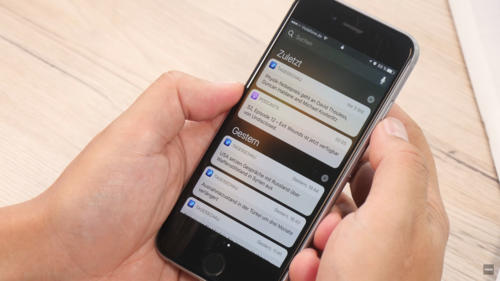
This will give you the iPhone notifications under control
You missed once again important notifications on your iPhone because they Flash again disappeared after accidental release of smartphones? With the right settings, you can prevent that. Here you'll learn all you need to know about the notifications on the iPhone.
iPhone notifications under control

First of all, you must add important notifications to your message center so that they are displayed even if you have already unlocked your iPhone, whether or not you want it. This option can be found here: "Settings> Messages". Now select the apps for which notifications are displayed in the message center. Make sure that the "Allow messages" and "Show in message center" check boxes are activated. In the same way, it works when you do not want to display notifications of certain programs. So you can disable the notifications for rather unimportant apps, so as not to sink into chaos.

Set a notification style for your notifications

In the next step, you can now configure the hint style in the form of banners and hints. Banners are displayed at the top of the screen, but disappear after a short time without having to activate. Notes, however, remain intact and require an active action - the preferred option for particularly important notifications. Navigate to the following menu: "Settings> Messages".

Now select the application for which you want to define a different hint style. For this to happen, the "Allow messages" option must be activated. Below are the options for the hint style. Here you can choose between "None", "Banner" and "Note". Again, you should take the opportunity to clean up a bit. Select the desired app and select "None" as a hint to continue receiving notifications for the app, but not a bold note in banner form.

Notification sound: To disable it

No question: Important messages should be signaled by a corresponding notification tone. But: Is this actually the case with every app? Do you have to accept any unimportant action on Facebook with a sound on your iPhone? In many cases probably not. Therefore you should go into yourself and check which sounds can be switched off safely. In the "Settings" under "Messages" select the respective app, for which you want to deactivate the sound. This is done by deactivating the menu item "Sounds" by slider.

Badges: How to switch the indicator counter off

The small red circles about apps and folders, the so-called badges, are a fairly practical thing. If an app has new notifications or notices ready for you, the little icon informs you about it without having to open the app before. But in everyday life, this can quickly become confusing, especially in a multitude of applications, and sometimes end in chaos. The problem: The badges only disappear when the corresponding app is started and the notifications have been called. Unfortunately, the icons can not be deactivated completely, but you can still determine for each application whether these badges should be played or not.

By the way: Apple calls the feature in its settings indicator counter. At first glance, it is unlikely to be clear what exactly is behind this description. And so you can disable the badges: "Settings> Messages". Select the desired app for which you want to disable the hints, and deactivate the "Indicator counter" item.

Summary


  1. Define notifications for the message center: "Settings> Messages"
  2. Select the app you want and turn "Show in Message Center" on or off
  3. Set the note style: "Settings> Messages" and select the app
  4. Make sure "Allow messages" is turned on
  5. In the Note Style area, choose "None", "Banner", or "Note"
  6. Turn sound on notifications on and off: "Settings> Messages"
  7. Select the app and make your choice at the "Tones" point
  8. Disable Badges: Select "Settings> Messages" and the app
  9. Turn slider to uncheck the red badges

Tuesday, March 14, 2017

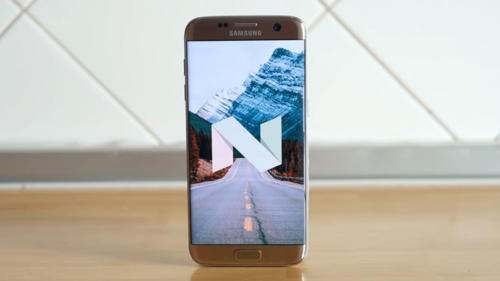
Galaxy S7: Troubleshoot WLAN issues after Android 7-update
After the update to Android, 7.0 nougat complain some owners of Samsung Galaxy S7 and Galaxy S7 edge wireless issues. We tell you five possible solutions.
Troubleshoot WLAN issues after Android 7-update

For some weeks now, Samsung has distributed the update to Android 7.0 Nougat for its two flagship Galaxy S7 and S7 Edge also in Germany. However, some users report problems with the wireless connection after updating their smartphones. However, it seems to be individual cases and not a fundamental problem with the update. The chances that you can do something against the mistakes are quite good. We'll show you which five tips could help.


Re-establish the network connection

The first thing you should do with connection problems with the wireless network is a reboot of the connection. Disable the WLAN interface on your smartphone, delete the connection and then re-enable the interface. Try to re-establish the connection to your wireless network. Possibly it can also help to restart the router.


Restart the Galaxy S7

If the replacement of the WLAN connection has not brought any improvement, the next step is a restart of the smartphone. It is even better to switch the unit off and then back on for a few seconds. If this does not have the desired effect, heavier guns must be produced.


Restart in safe mode

Next, you should restart the Galaxy S7 again, this time, however, in safe mode. To do this, you first switch the device off and then back on. Once the Samsung logo appears on the display, press the volume down button and hold down until the boot process is completed.

In secure mode, third-party apps remain disabled, so you can check if another app is responsible for the problem with the wireless connection. Try again to connect your Galaxy S7 to the WLAN network. If that works, it is clear that another app is the fault of the error. Unfortunately, the application does not reveal which app it is.


If you are suspicious of your app, you can find it by going to Settings> Apps> 'App Name' 'and then pressing the' Force Force 'button and then under' Memory ' "Delete all data from the app including the cache. If your suspicion is correct, the wireless connection should then also function again in the normal mode.
Samsung reveals colors of the Galaxy S8
Even before the product launch Samsung could have betrayed now the colors, where it probably will be buying the Galaxy S8 to the release. In addition to standard colors like black and silver, a quite extravagant paint could to join.
Samsung reveals colors of the Galaxy S8

Samsung is not only in South Korea the advertising drum for the Galaxy S8, but is even asking potential customers about the preferred color for their "new Galaxy". At least in India, Samsung fans could make their choice in advance, reports SamMobile. The potential buyers could decide on a separate registration page between black, silver and amethyst. Previously, the color Violet was recently thrown into the room, but almost the same. At least, amethyst is quite similar to the violet color.

Unveiled Samsung on 29th March the Galaxy S8 in Amethyst?

This does not mean, of course, that Samsung will offer these color options for the Galaxy S8 as well. But the thought probably does not seem to be absurd. Not only Samsung itself, also the Brazilian Onlineshop Submarino offers its visitors the same color options, white GSMArena to report. Meanwhile the hint of the Indian Samsung website has disappeared again. Instead, registry entries now have the ability to select features such as an "excellent camera" or "advanced battery life."


In which colors the Galaxy S8 will ultimately give for the release, Samsung will reveal on March 29th in the context of an Unpacked Event. Then we will also be able to convince ourselves of the new user interface, whose minimalist look was recently shown on leaked screenshots.
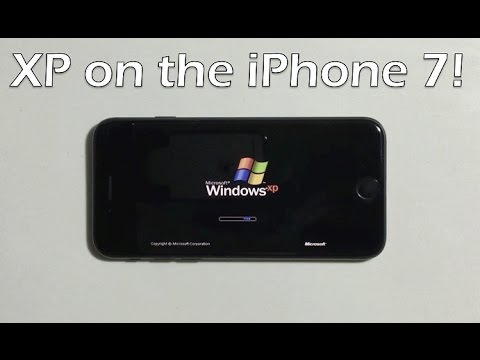
Windows-iPhone: Hackers brings to the iPhone 7 Windows XP
Recently also Windows XP - at least with an emulator running on the iPhone 7. In a YouTube video, a hacker demonstrated how to get the old PC operating system on the Apple Smartphone.

If you opt for an iPhone, you can automatically switch to the operating system iOS with all its advantages and disadvantages. But now there is a YouTube video showing how a hacker can run the ancient PC operating system Windows XP on a current iPhone 7 - and even use it with the touchscreen.

No hack but an emulator

However, this is not really a hack, but actually an emulator, which is installed on the iPhone and then runs Windows XP on the device. Remarkable is how well the emulator apparently functions and how the control of the mouse pointer was adapted to the touchscreen of the smartphone. This way the screen reacts like a trackpad: The pointer is moved by wiping and menus and folders can be opened by tapping.


Of course, the user friendliness remains modest overall. As usual with most emulators, it takes a feeling eternity to load the operating system on the iPhone and also the operation of the icons remains ultimately quite tricky. In the end, with Windows XP on the iPhone 7 but can not really do much. After all, the operating system was developed for completely different devices. Nevertheless, it is, of course, cool to see Windows XP on a smartphone.